Organizers can efficiently manage and modify their events by logging into their Ticmint organizer account. Through the platform's intuitive dashboard, they can edit event details such as date, time, venue, ticket availability, and other key information. This ensures flexibility and seamless event updates without disrupting attendee engagement. Additionally, any changes made are reflected in real-time, providing an enhanced user experience.
Edit an Event
Steps to Edit an Event
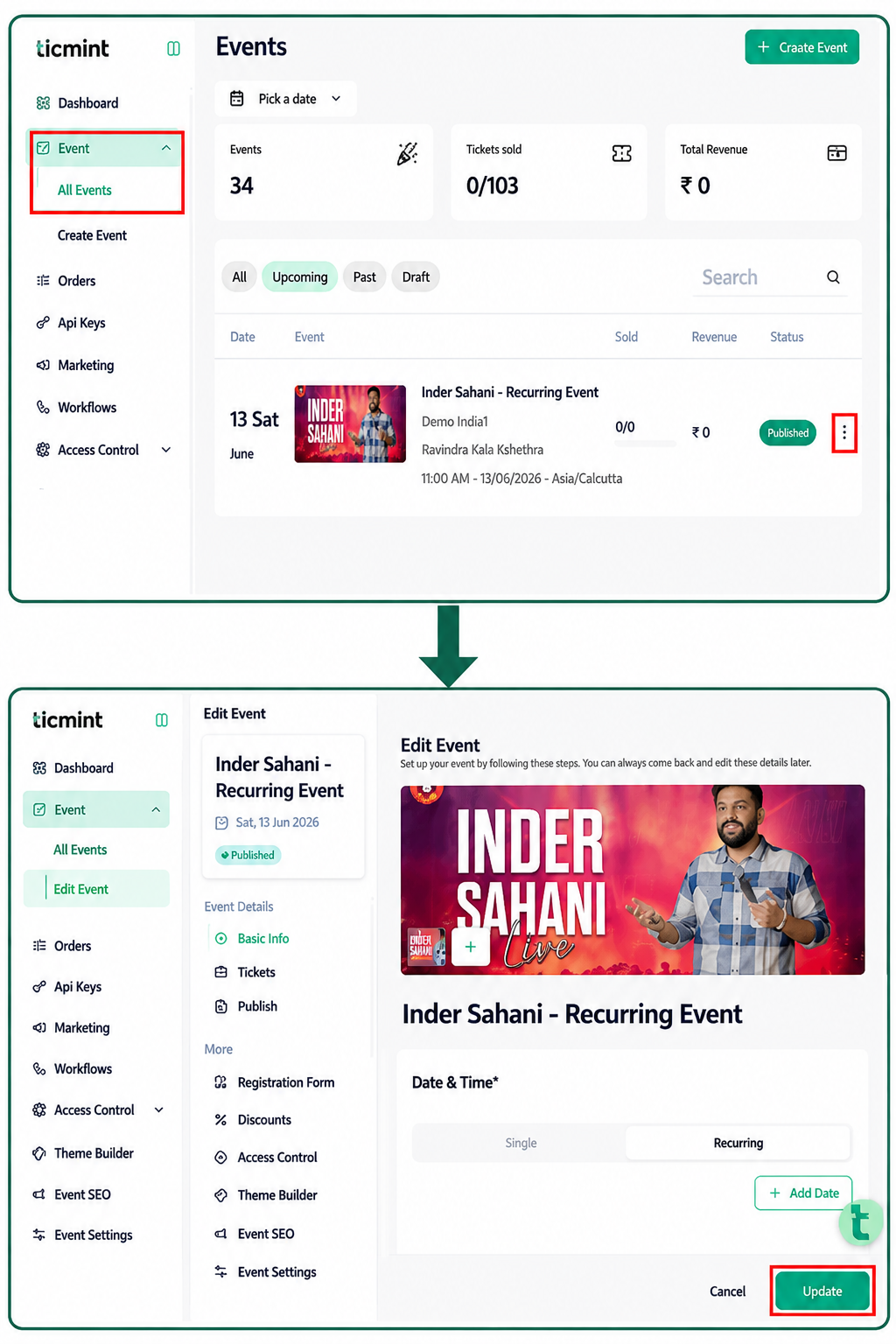
Click on Event.
Click on All Events.
Locate the event you want to edit.
Click on the three dots (⋮) next to the event.
Select Edit from the menu.
Make the required changes to the event details.
Click Update to save the changes.
Result
The selected event will be updated successfully, and the changes will be saved.
Learn more about using an online ticketing platform on the Ticmint blog.
Was this article helpful?
That’s Great!
Thank you for your feedback
Sorry! We couldn't be helpful
Thank you for your feedback
Feedback sent
We appreciate your effort and will try to fix the article